
Machine defaults
Once a bend part is tooled, you can access the Machine Defaults option from the Settings menu.
Most parameters in Bend-CAM Settings, Bend Outputs, Bend View, and Bend Cell are similar to the Application Settings. For explanation of these parameters, refer to the Application Settings section.
| The settings available in the Machine Defaults editor depends on the machine type and configuration selected. |
The Bend Defaults settings allow you to configure various parameters related to the bending process, which includes Beam cycle, Back-gauge movement, and Other settings.
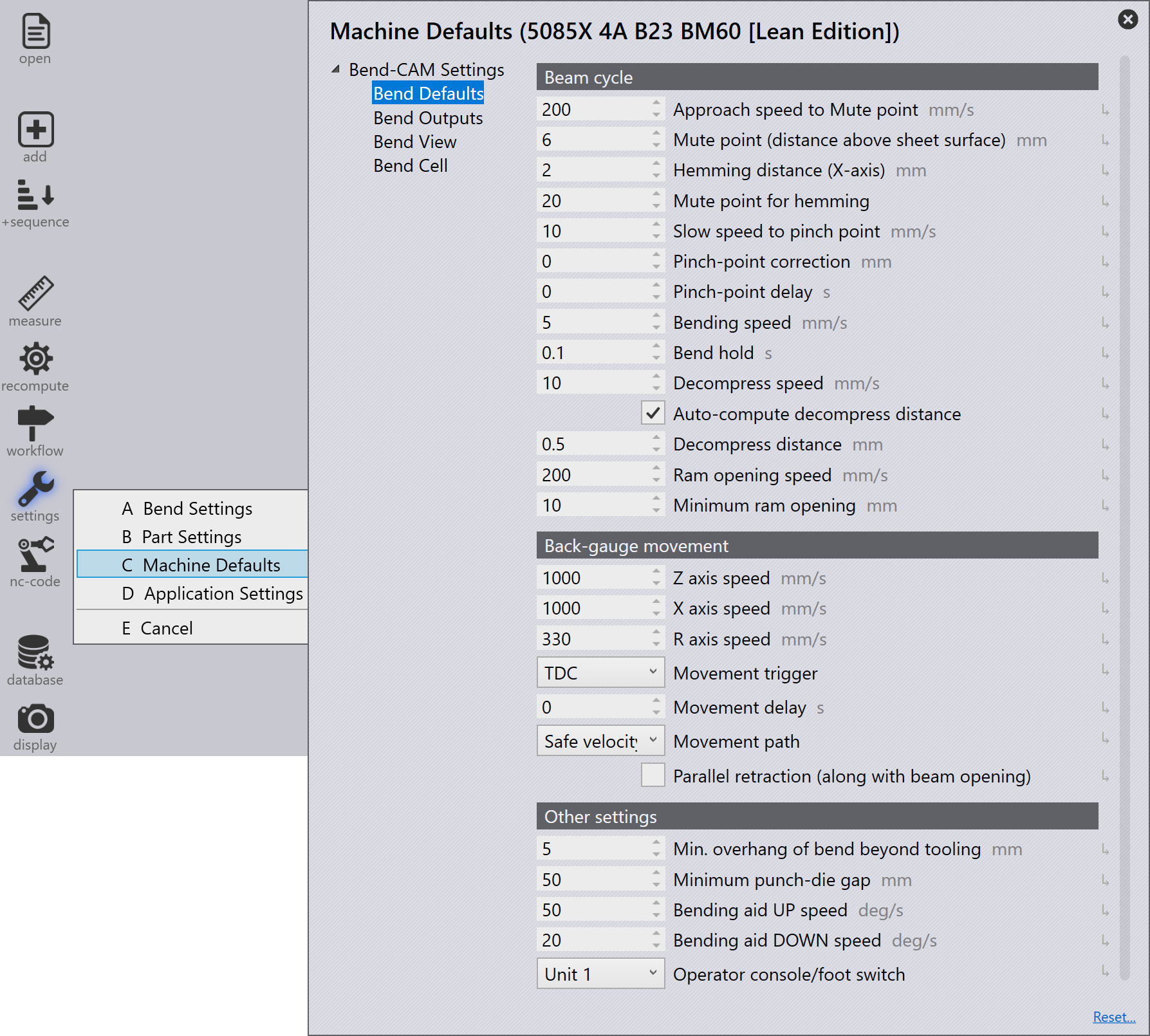
Beam cycle
Approach speed to Mute point - The speed of the beam up to the mute point.
Mute point (distance above sheet surface) - At the mute point, the max speed (Rapid down) is automatically switched over to the reduced speed (Clamping).
Hemming distance (X-axis) - This distance refers to the gap between the hem edge and the tool surface. It is provided to prevent the hem edge from butting against the hemming tool.
| This setting is applicable only for TruBendCell machines. |
Mute point for hemming - Mute point distance for the hem tool.
Slow speed to pinch point - The speed of the beam between the mute point and the clamping point.
Pinch-point correction - Correction value added to the standard pinch point.
Pinch-point delay - Delay time given for the pinch-point before bending starts.
Bending speed - The speed of the beam during bending.
Bend hold - The beam will remain at the lower dead point for this duration.
Decompress speed - Speed of the beam along the decompression path (decompression).
Auto-compute decompress distance - Automatically computes the decompression distance based on the bend angle and material properties.
Decompress distance - With the decompression path, the tension in the machine’s frame is released in a controlled fashion after a bend, as it is under maximum tension at the lower dead point (LDP). The decompression path moves the beam upwards at a slow speed.
Minimum ram opening - The beam opening is the measure by
which the beam moves upward after a bending operation.
Positive value: Press beam is positioned above the mute point.
Negative value: Press beam is positioned below the mute point.
Back-gauge movement
Z axis speed - Backgauge speed for Z axis movements.
X axis speed - Backgauge speed for X axis movements.
R axis Speed - Backgauge speed for R axis movements.
Movement trigger - Trigger for backgauge movement.
Movement delay - Delay before backgauge movement starts.
Movement path - Defines the path taken by the backgauge movement.
Safe velocity: The backgauge moves around the danger zone at the programmed speed (50 mm behind and above the tool). The backgauge will move forwards in a final step (X axis). The backgauge will move at reduced speed when the distance between the gauge finger and the tool is less than 50 mm.
Safe path: The backgauge moves around the danger zone at the programmed speed (50 mm behind and above the tool). The backgauge will move downwards in a final step (R axis). All axes move at the programmed speed.
Parallel retraction (along with beam opening) - The backgauge retracts in parallel with the beam opening.
Other settings
Min. overhang of bend beyond tooling - Minimum bend length beyond the tooling.
Minimum punch-die gap - Minimum gap between the punch and die after mounting. Minimum punch-die gap is the subtraction of the open height (distance between the punch rail and die rail) and the die height.
Bending aid UP speed - Upward speed of the bending aid.
Bending aid DOWN speed - Downward speed of the bending aid.
Operator console/foot switch - The operator console or foot switch used to control the bending aid. Operator can select between any one or both the foot switches to operate the machine.