
Flux Reference Manual

  • Welcome to Flux
  • Introduction
    • Installing the software
    • The user interface
    • Part workflow
  • CAD
    • 2-D Import
      • 2-D Cleanup
    • 3-D Import
      • Import 3D Model
      • Import assembly
      • Form detection
      • Component detection
    • Modifying the geometry
    • Attachments
  • Laser CAM
    • Part workflow
      • Editing panels
        • Laser cut
          • Approach
          • Withdrawal
          • Microjoint
          • Advanced
        • Contour
        • Scrap cut
        • Part
        • Corner treatment
      • Quick-Nest
    • Job workflow
      • Job panel
        • Sheets tab
        • Parts tab
        • Layouts tab
        • Summary tab
      • Edit layout
        • Nesting modes
        • Placement panel
        • Sequencing
        • Slice sheet
    • Bevel cut
      • Open contours
      • Variable bevel
      • Miscellaneous
    • Advanced
      • Finishing rules
      • Edit LTT
      • FlyLine
      • TwinLine
        • Strategy
        • Microjoints
        • Further settings
      • DetectLine
  • Bend CAM
    • Create bend data
    • Bend navigator
    • Edit bend data
      • Edit a bend
      • Edit a tool mount
      • Edit a bend setup
      • Edit the back-gauges
      • Edit angle measurement
      • Bends spreadsheet
      • Changing the sequence
      • Adding setups and stations
    • Advanced
      • Angle measurement
      • Batch process
      • Recompute solution
      • Tonnage check
    • Bending Aids
  • BendMaster CAM
    • Bend navigator
    • Part pickup
      • Pickup from pallet
      • Pickup from dispenser
    • Robotic bending
      • Insertion
      • Bending
      • Extraction
    • Regripping
      • Regrip panel
      • Add regrip
      • Edit regrip
      • Regrip with jaw
      • RG-Stations panel
    • Part deposit
      • Deposit panel
      • Repeat and sequence
      • Add separator sheets
      • Lock part-rest
      • Deposit pattern types
    • Advanced
      • Waypoints
      • Cell configuration
      • Custom Cell Components
      • Gripper database
        • Create a gripper
        • Import gripper from DXF
        • Import Suction Cup
  • FlexCell CAM
    • Bend navigator
    • Part pickup
      • Pickup from pallet
      • Centering table
    • Robotic bending
      • Insertion
      • Bending
      • Extraction
      • Advanced
    • Regripping
      • Regrip panel
      • Add/Remove regrip
      • Gripper Panel
      • RG-Stations panel
    • Part deposit
      • Deposit panel
      • Deposit Tabs
    • Advanced
      • Waypoints
      • Cell configuration
      • Gripper database
        • Create a gripper
        • Import gripper from DXF
    • Troubleshooting
  • Fold CAM
    • Create fold data
    • The Fold view
    • Editing Fold data
      • Edit a bend
      • Edit a side/section
      • Change the sequence
      • Edit the blank-holders
      • Edit the gauging
      • Edit the blades
      • Edit the loading
      • Edit the unloading
    • Tool inventory
    • Advanced
      • Custom air-gap tables
      • Manual bend completion
      • Required flange length
  • Settings
    • Drawing
      • Layers
      • Dimensions
      • View
    • Bend CAM
      • Machine defaults
      • Bend outputs
      • Bend view
      • Bend cell
    • Cut CAM
      • Layout
        • Nest settings
        • Sheet
        • Sheet handling
        • Skeleton cuts
        • Work support
      • Laser CAM
        • Sequence
      • Cut outputs
      • Cut view
    • Panel bending
      • Defaults
      • ZBW carriers
      • Outputs
    • Reports
      • Item defaults
    • Import/Export
    • Environment
  • Database
    • Materials
    • Machines
    • Bend tools
    • Bend deductions
    • Bend grippers
    • Forms and Components
  • Reports
    • Report designer
    • Fields, pictures and tables
    • Bands (sub-reports)
    • Labels, bitmaps and shapes
  • Appendix
    • Supported 3D formats
    • Separator sheet DXF
    • Bend tool DXF
    • The Adapt Geometry feature
BendMaster CAM
/
Regripping
/
Regrip panel

Regrip panel

Regrip panel

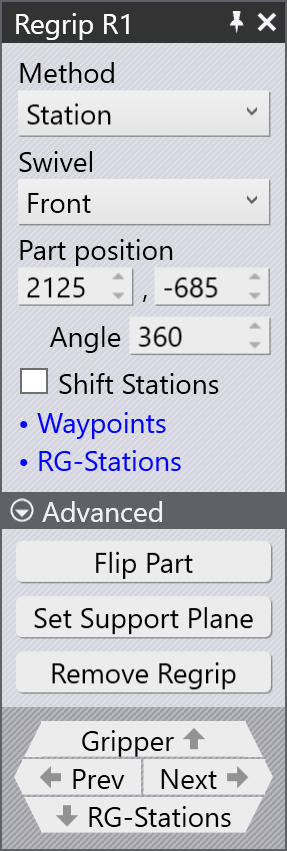
A typical Regrip panel is shown alongside:

To access the regrip panel:

  • Click twice on the R1 cell in the bend navigator.

  • Alternatively, click on the part held by the BendMaster gripper at the regrip position.

Method of regrip

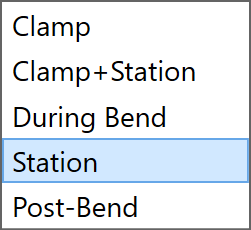
The five methods of regripping a part are:
Regrip method
  1. Clamp

  2. Clamp+Station

  3. During Bend

  4. Station

  5. Post-Bend

Clamp

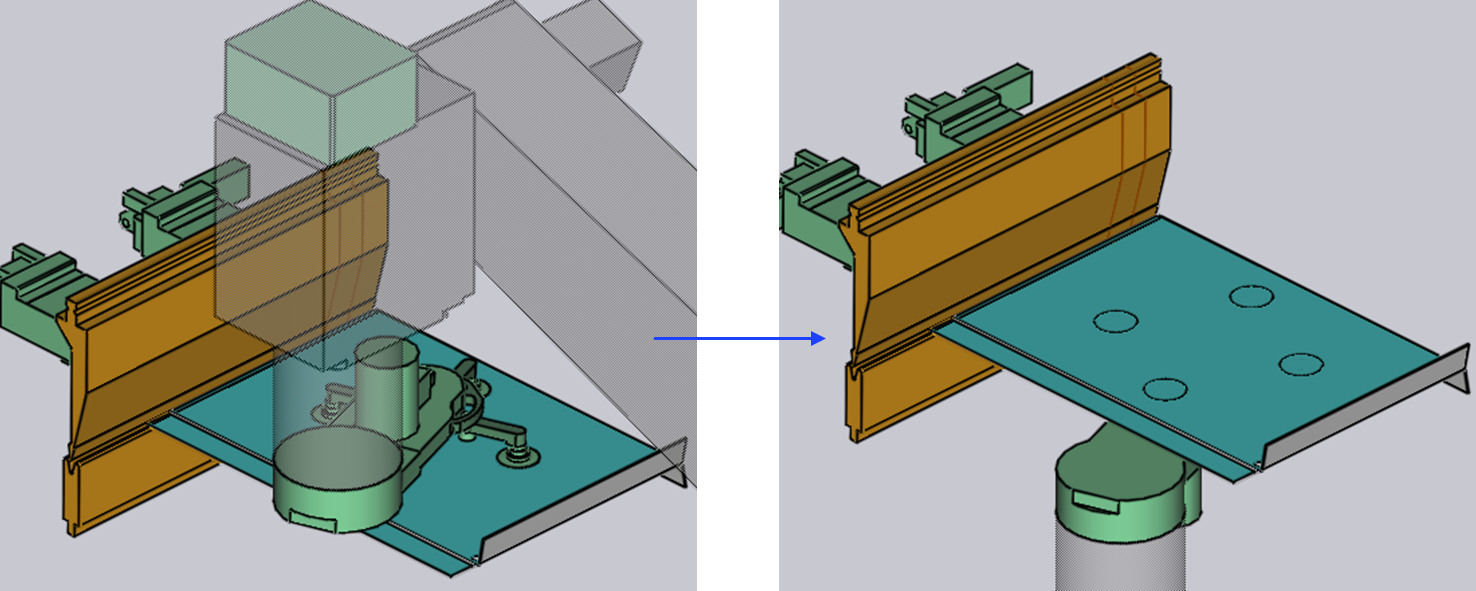
When you select the Clamp method, the gripper relies on the bending tool (punch and die) to hold the part, complete the swivel sequence and then re-grips from the other side of the part.

Insert part first and BG: Z before X are already explained in Insertion strategy.
Clamp

Clamp+Station

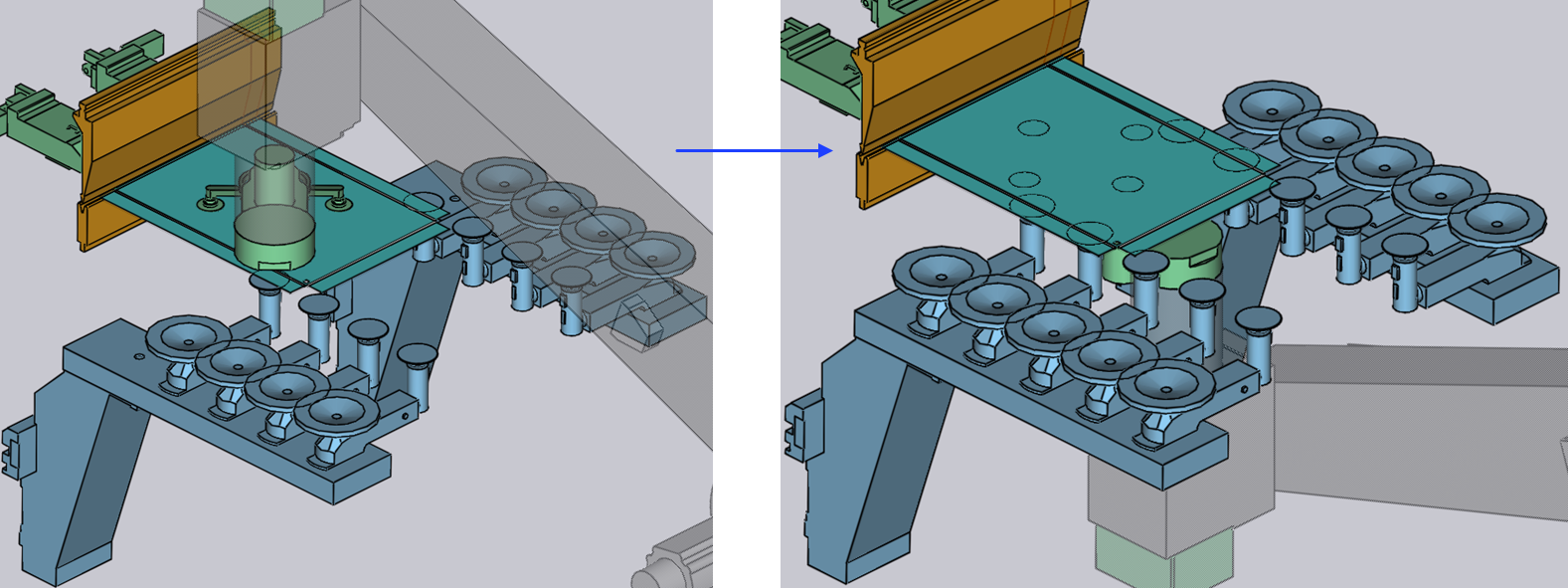
When you select the the Clamp+Station method, the regripping happens at the clamping point but also on the RG-Stations supporting the part.

This method is useful when bending lengthy overhanging parts.
Clamp+Station

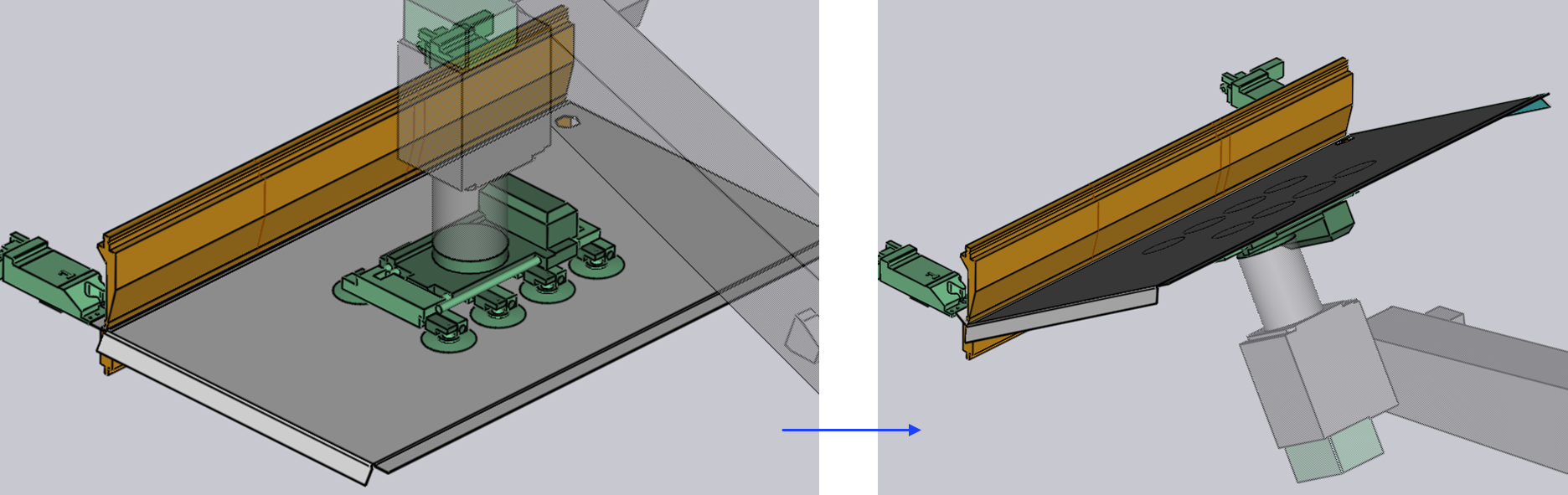
During Bend

In the During Bend method, as soon as the bending operation starts the gripper starts to swivel simultaneously (if required) and performs the regripping exactly at the end of the bending operation.

Opening of the punch starts only when the part is firmly held by the robot gripper.
During bend

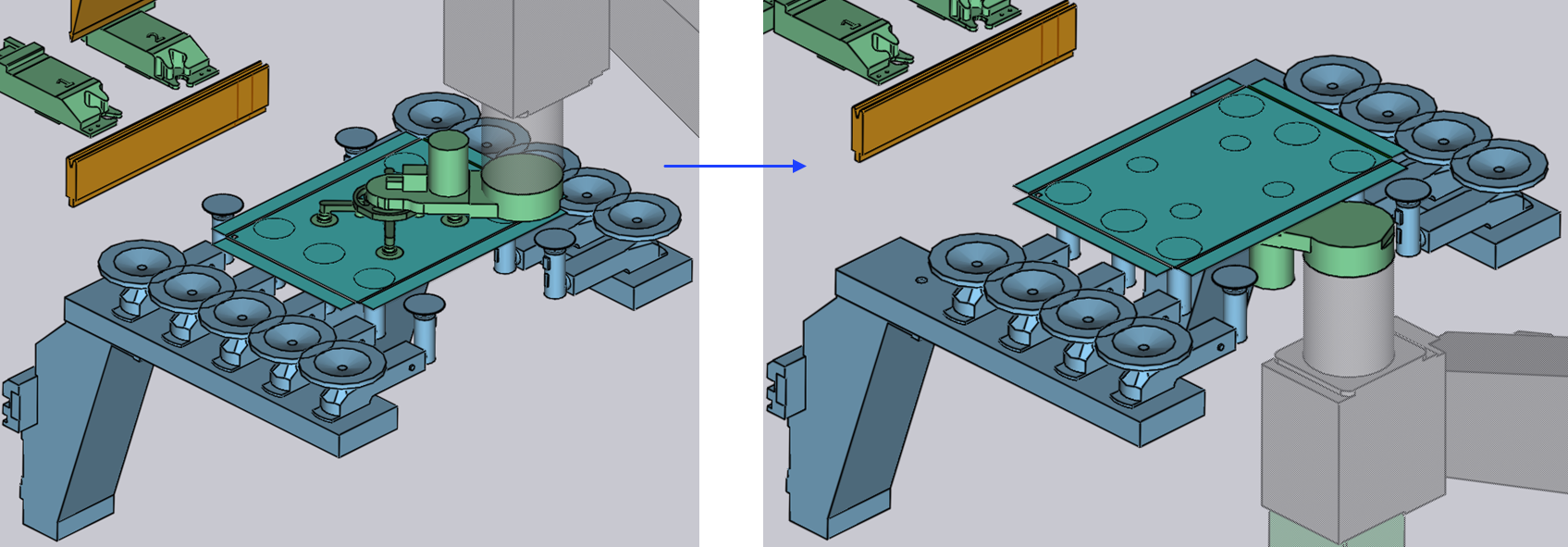
Station

When you select the the Station method, the regripping happens with the RG-Stations supporting the part.

This method is essential when handling large dimension parts.
Clamp

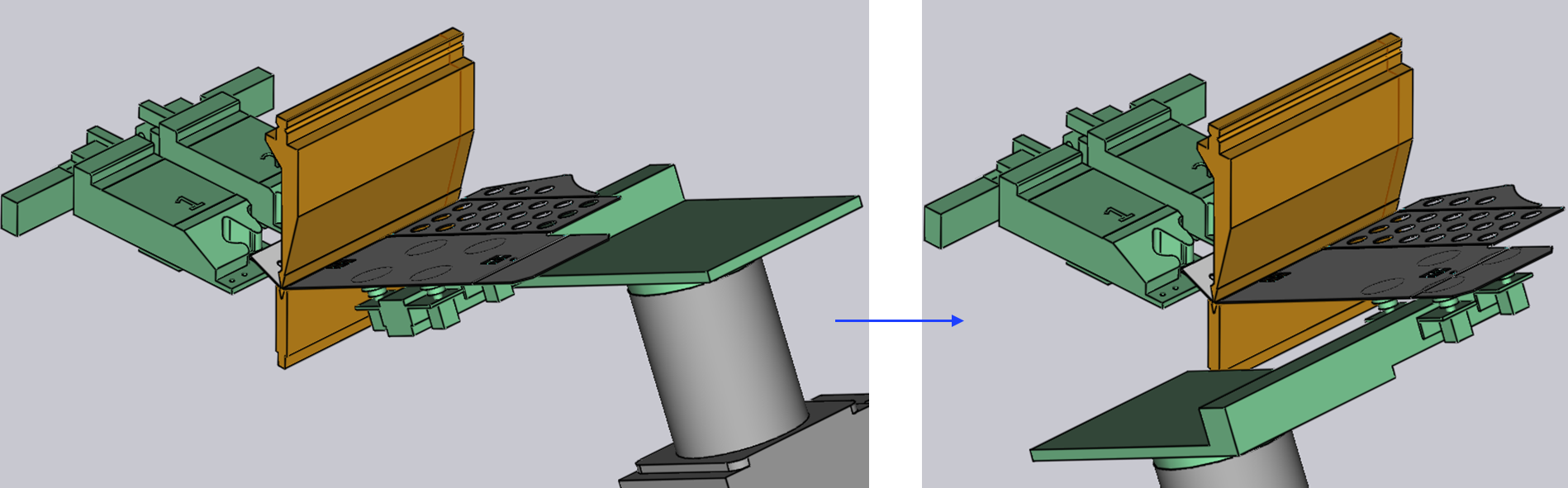
Post-Bend

When you select the the Post-Bend method, the regripping happens after the bending process with the part still at the clamping point.

In this method, the robot gripper will assist the part during the bending operation. Once the bending operation is completed with expected results, the regripping operation will start.
Post bend

Swivel

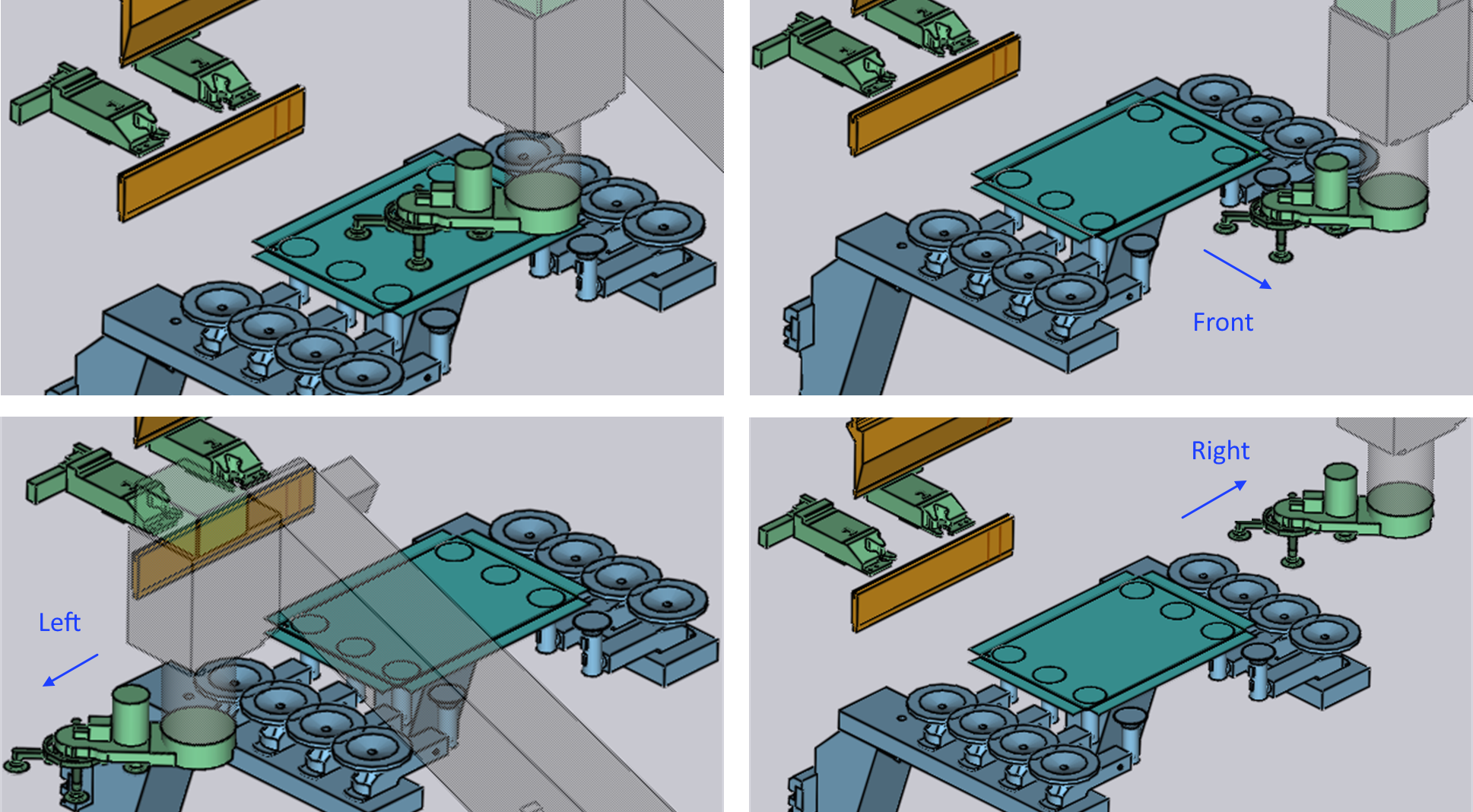
During regripping operation, the robot gripper places the part either between the bend tool or on the RG-Stations gripper and then move to the other side of the part to perform regrip.

In order to prevent collision, robot gripper is extracted slightly away from the part, bent tools, and the RG-Stations and then perform a swivel movement. This extraction and swivel movement happens in three ways:

  1. Front

  2. Left

  3. Right

The below image shows the extraction of gripper:
Swivel

After this movement, the gripper is swivels and moves to the bottom of the part and performs a regrip.

Contents

  • Method of regrip
  • Clamp
  • Clamp+Station
  • During Bend
  • Station
  • Post-Bend
  • Swivel
Regripping Add regrip

      Copyright © 2025 TRUMPF Metamation. All rights reserved.

    Compiled by Bento