
Flux Reference Manual

  • Welcome to Flux
  • Introduction
    • Installing the software
    • The user interface
    • Part workflow
  • CAD
    • 2-D Import
      • 2-D Cleanup
    • 3-D Import
      • Import 3D Model
      • Import assembly
      • Form detection
      • Component detection
    • Modifying the geometry
    • Attachments
  • Laser CAM
    • Part workflow
      • Editing panels
        • Laser cut
          • Approach
          • Withdrawal
          • Microjoint
          • Advanced
        • Contour
        • Scrap cut
        • Part
        • Corner treatment
      • Quick-Nest
    • Job workflow
      • Job panel
        • Sheets tab
        • Parts tab
        • Layouts tab
        • Summary tab
      • Edit layout
        • Nesting modes
        • Placement panel
        • Sequencing
        • Slice sheet
    • Bevel cut
      • Open contours
      • Variable bevel
      • Miscellaneous
    • Advanced
      • Finishing rules
      • Edit LTT
      • FlyLine
      • TwinLine
        • Strategy
        • Microjoints
        • Further settings
      • DetectLine
  • Bend CAM
    • Create bend data
    • Bend navigator
    • Edit bend data
      • Edit a bend
      • Edit a tool mount
      • Edit a bend setup
      • Edit the back-gauges
      • Edit angle measurement
      • Bends spreadsheet
      • Changing the sequence
      • Adding setups and stations
    • Advanced
      • Angle measurement
      • Batch process
      • Recompute solution
      • Tonnage check
    • Bending Aids
  • BendMaster CAM
    • Bend navigator
    • Part pickup
      • Pickup from pallet
      • Pickup from dispenser
    • Robotic bending
      • Insertion
      • Bending
      • Extraction
    • Regripping
      • Regrip panel
      • Add regrip
      • Edit regrip
      • Regrip with jaw
      • RG-Stations panel
    • Part deposit
      • Deposit panel
      • Repeat and sequence
      • Add separator sheets
      • Lock part-rest
      • Deposit pattern types
    • Advanced
      • Waypoints
      • Cell configuration
      • Custom Cell Components
      • Gripper database
        • Create a gripper
        • Import gripper from DXF
        • Import Suction Cup
  • FlexCell CAM
    • Bend navigator
    • Part pickup
      • Pickup from pallet
      • Centering table
    • Robotic bending
      • Insertion
      • Bending
      • Extraction
      • Advanced
    • Regripping
      • Regrip panel
      • Add/Remove regrip
      • Gripper Panel
      • RG-Stations panel
    • Part deposit
      • Deposit panel
      • Deposit Tabs
    • Advanced
      • Waypoints
      • Cell configuration
      • Gripper database
        • Create a gripper
        • Import gripper from DXF
    • Troubleshooting
  • Fold CAM
    • Create fold data
    • The Fold view
    • Editing Fold data
      • Edit a bend
      • Edit a side/section
      • Change the sequence
      • Edit the blank-holders
      • Edit the gauging
      • Edit the blades
      • Edit the loading
      • Edit the unloading
    • Tool inventory
    • Advanced
      • Custom air-gap tables
      • Manual bend completion
      • Required flange length
  • Settings
    • Drawing
      • Layers
      • Dimensions
      • View
    • Bend CAM
      • Machine defaults
      • Bend outputs
      • Bend view
      • Bend cell
    • Cut CAM
      • Layout
        • Nest settings
        • Sheet
        • Sheet handling
        • Skeleton cuts
        • Work support
      • Laser CAM
        • Sequence
      • Cut outputs
      • Cut view
    • Panel bending
      • Defaults
      • ZBW carriers
      • Outputs
    • Reports
      • Item defaults
    • Import/Export
    • Environment
  • Database
    • Materials
    • Machines
    • Bend tools
    • Bend deductions
    • Bend grippers
    • Forms and Components
  • Reports
    • Report designer
    • Fields, pictures and tables
    • Bands (sub-reports)
    • Labels, bitmaps and shapes
  • Appendix
    • Supported 3D formats
    • Separator sheet DXF
    • Bend tool DXF
    • The Adapt Geometry feature
BendMaster CAM
/
Advanced
/
Gripper database
/
Create a gripper

Create a gripper

The way in which the gripper holds the part might need to be changed between some bends. The Bend database contains a large number of bending grippers, that can be used for the automated bending process. If required, it is possible to create own grippers adapted to the respective part geometry.

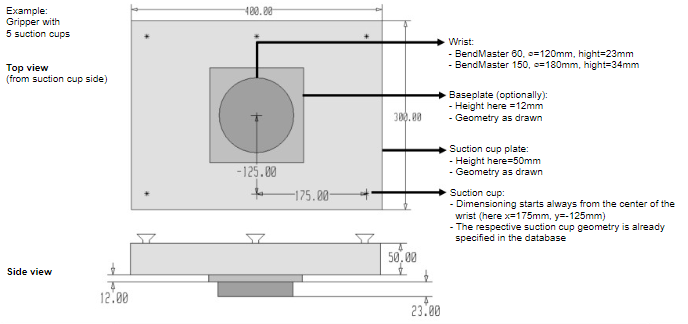
In order to create a gripper, information about the wrist, optional base plate, suction plate, and suction cups, together with their respective positions, are needed.

For this purpose a DXF file, including the respective geometry and parameters needs to be created.

Create your own gripper geometry with the desired suction cups, using the drawing module.

To create a new gripper:

  1. Open a new drawing inside Flux and select the sketch option.

    Sketch

  2. Create a drawing of the gripper with the wrist, base plate and suction cup plate (alternatively, open an existing DXF drawing and adapt it as required).

  3. Apply a different colour (e.g. green) to the contour of the base plate.
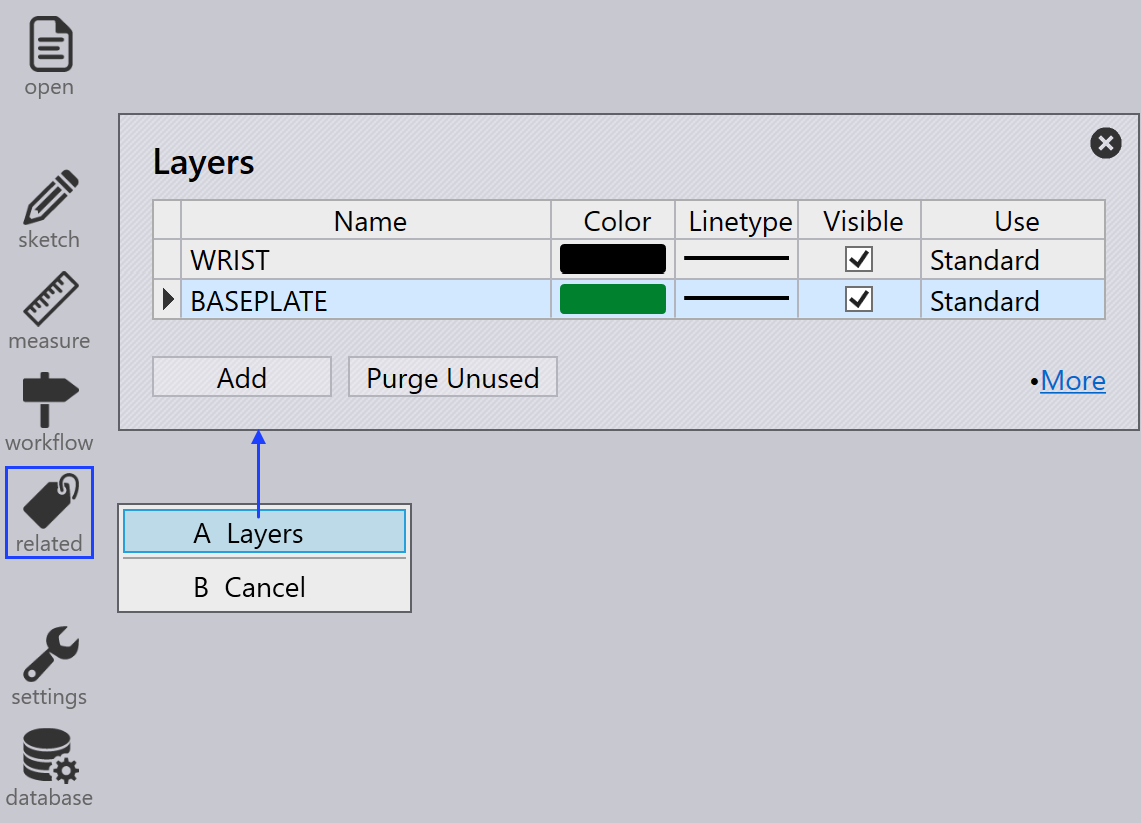
    Related
  4. For a correct graphical display of the optional base plate, it must be in a separate layer. Pick the base plate rectangle and choose the layer as BASEPLATE. The layer color changes to green.
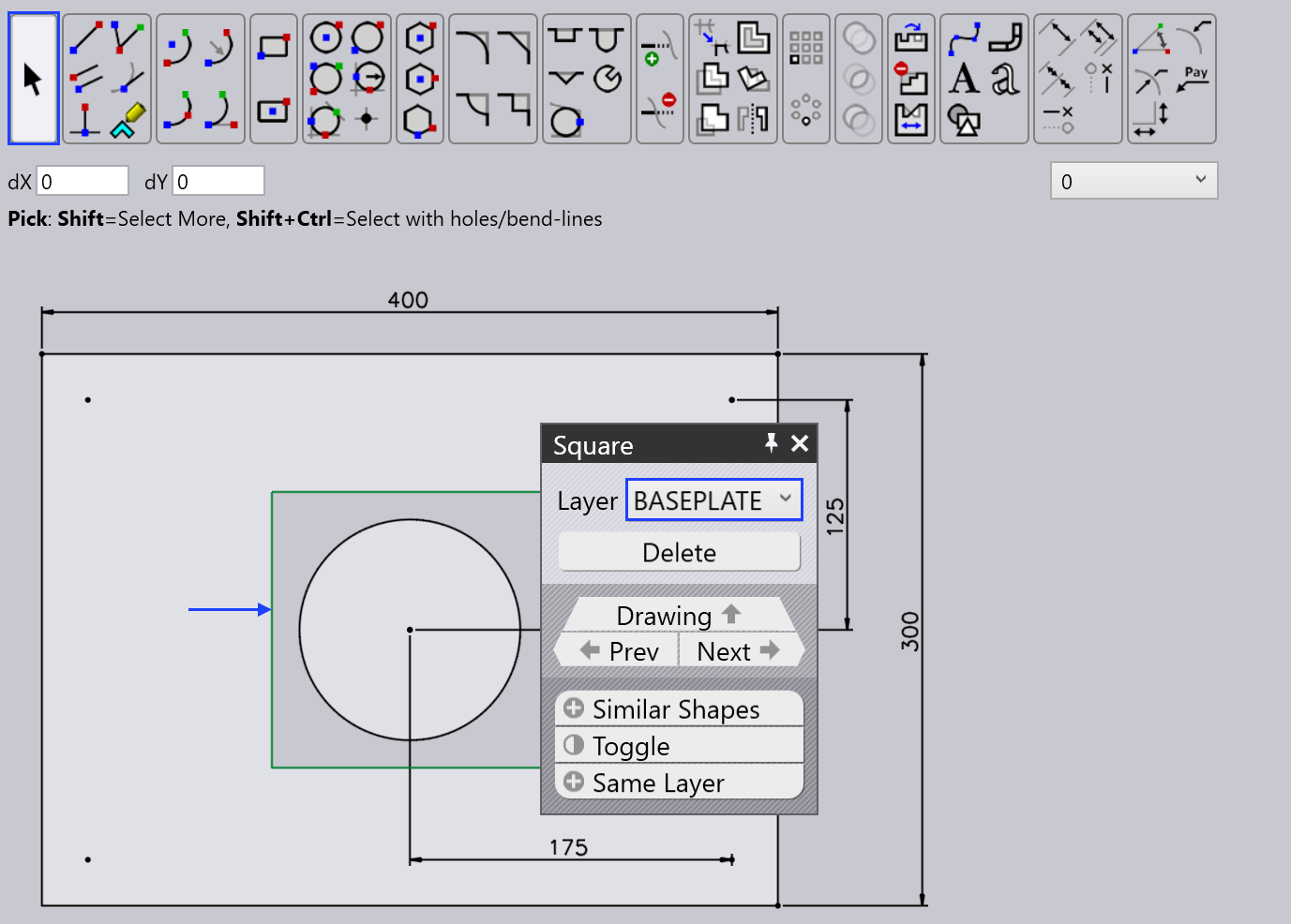
    Apply layer
  5. Make sure that the centre of the wrist is at the drawing zero point and type the required text entities for the parameters.
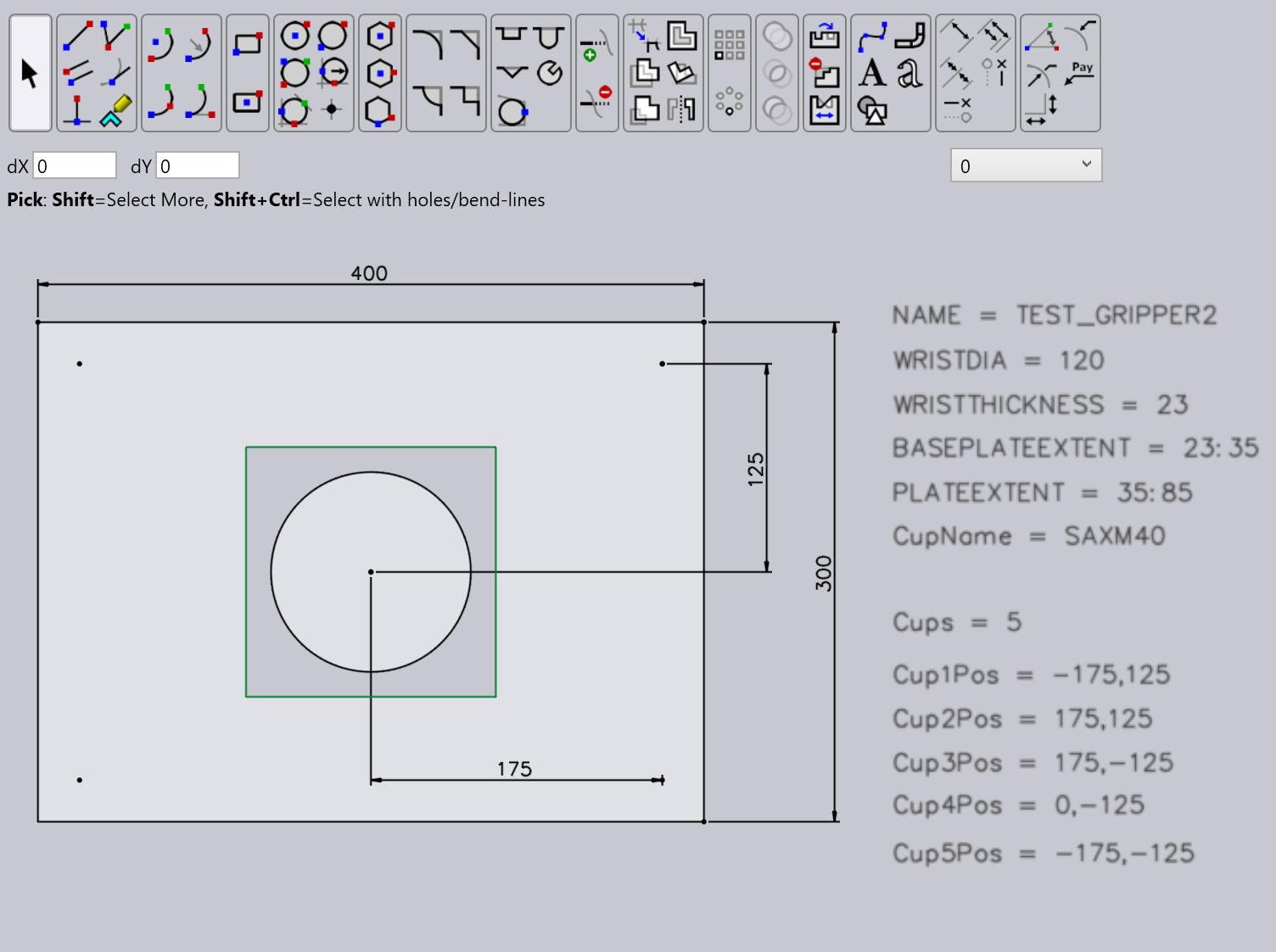
    Text entities
  6. Many of the settings for this gripper come from text entities that are of the form KEY=VALUE. Here are the possible keys, with their meanings

    key Meaning

    Name

    The name of the gripper

    Weight

    Weight of the gripper, in kg.

    WRISTDIA

    Wrist diameter (must be 120/180 corresponding to BM60/BM150)

    WRISTTHICKNESS

    The thickness in Z of the wrist cylinder underneath. The wrist cylinder extends from Z=0 to this value

    PLATEEXTENT

    The Z extent (in the form ZMIN:ZMAX) of the plate. Typically, one sets ZMIN the same as WRISTTHICKNESS, so the plate starts where the wrist-cylinder ends.

    BASEPLATEEXTENT

    The Z extent of the baseplate (see the section below on Two-Layered-Grippers)

    CUPNAME

    The type of suction cup used for this gripper (like SAXM50)

    CUPS

    The number of suction cups

    CUP1POS

    The position of the first suction cup in the form X,Y

    CUP2POS

    The position of the second suction cup

    CUPNPOS

    The position of the Nth suction cup

    CUPDIA

    Can be used instead of CUPNAME to specify a suction cup (not recommended).

  7. Export as DXF file under the below mentioned path after updating the text parameters from the drawing module.
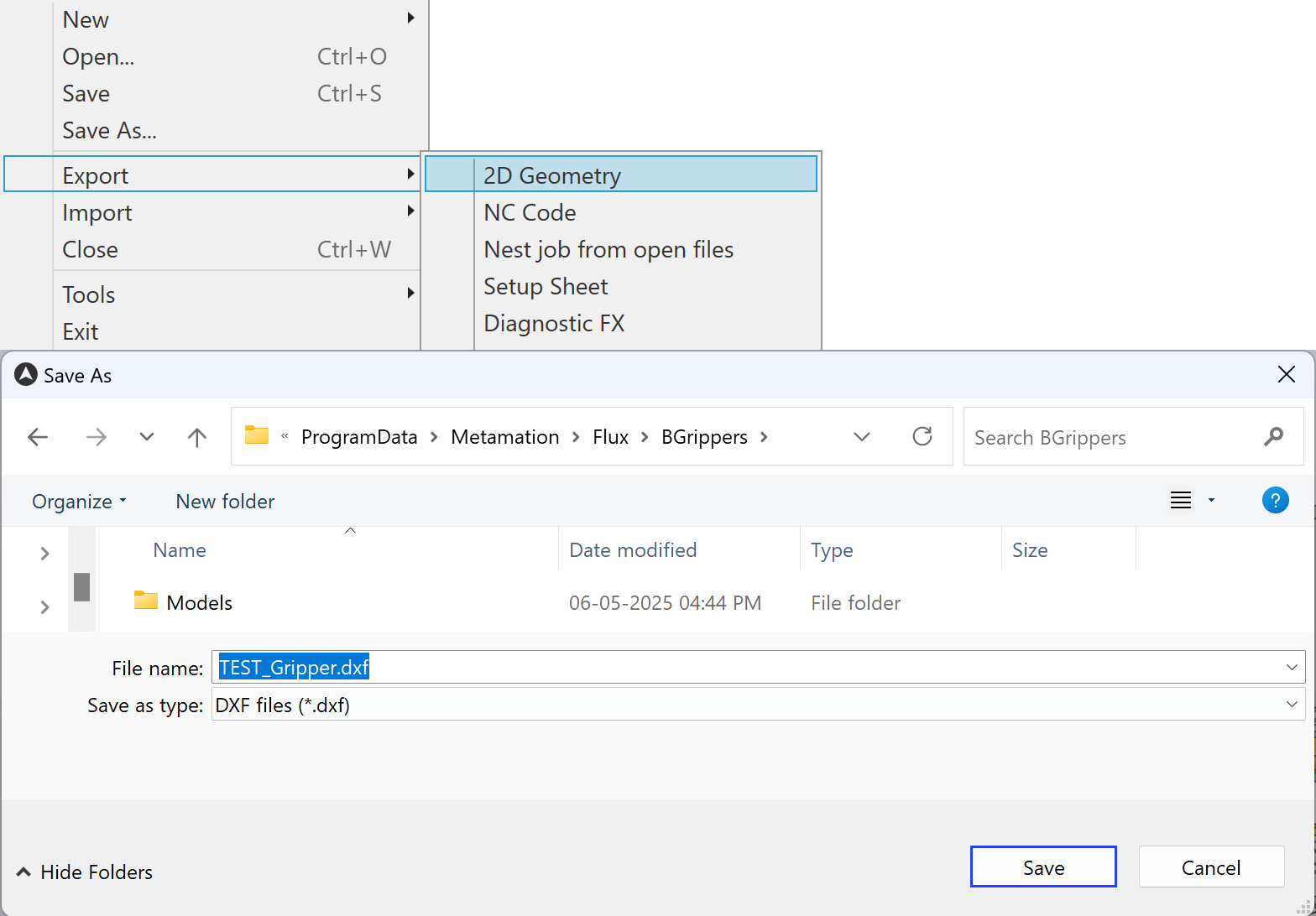
Export gripper

Suction cup types

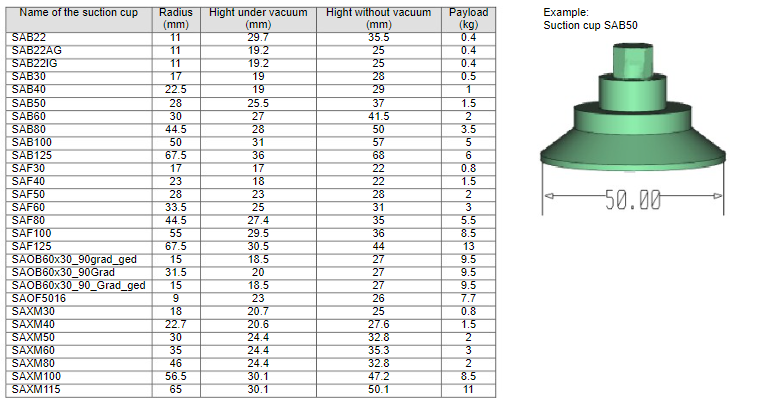
In the Bend database there are different types of suction cups available, which can be used when configuring a new gripper.
Suction cup
Figure 1. Suction cup database
Example gripper
Figure 2. Example gripper from database

Contents

  • Suction cup types
Gripper database Import gripper from DXF

      Copyright © 2025 TRUMPF Metamation. All rights reserved.

    Compiled by Bento