
Sheets tab
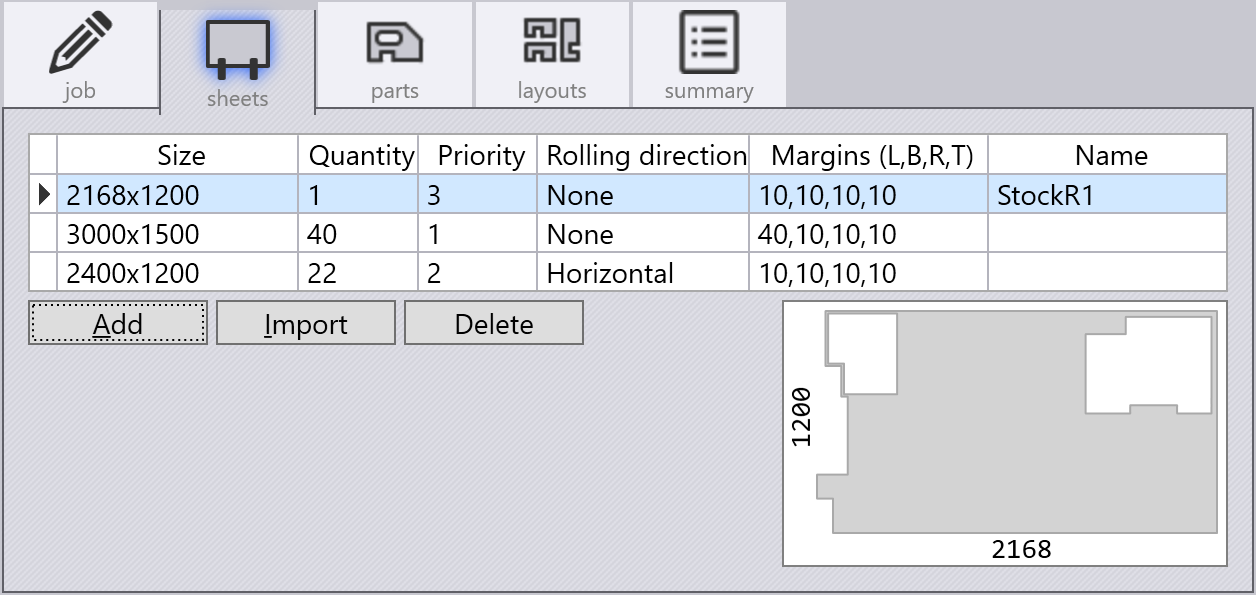
The sheets tab of the Job Panel is used to add raw material (sheets) for nesting.
-
Use Add to add a rectangular sheet.
-
The Size specifies the width and height of the sheet, and the Margins specify the margins on the four sides where no parts should be nested.
-
The Quantity is the count of sheets available in the inventory.
-
Priority is used to suggest to the nesting engine which sheets it should try to use first (starting with the smallest number).
-
The Rolling direction is used to specify the grain of the sheet, and is useful when nesting parts that have a particular grain specification - Flux will match the grain by rotating the part appropriately during nesting.
-
-
Use Import to import an irregular sheet (a remnant sheet from an earlier nest, or created from some other software). The sheet can be any 2D format such as a .DXF, .GEO or .FX file. There should be a single closed outer contour that is the boundary of the sheet. Any closed inner contours inside this are interpreted as holes on which no parts should be nested. You can see such an imported irregular sheet in the image above.
-
Use Delete to delete a sheet from the inventory.