
Manual bend completion
In certain cases, avoiding collisions requires splitting a bend operation into two steps: a pre-bend followed by subsequent bends, after which the bend is completed. The pre-bend is performed using a standard FZ1 or FZ3 operation up to the defined pre-bend angle, while the post-bend is manually completed with FZ31 manual axis moves.
Pre-bending can be enabled for a bend operation unless it is the last or sole operation on a side. Enabling it splits the bend operation into two bends a Prebend and Post-bend. - The Pre-bend has the same sequence number as the original bend operation. - A Post-bend is added one bend operation after the pre-bend.
In the example images shown below, pre-bending is enabled for Bend 1 and Bend 3 is the newly added post-bend.
The prebend angle can be adjusted using the Prebend text box. The angle in the text box is the external angle of the bend.
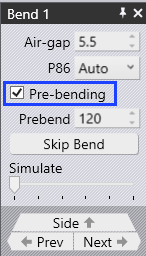
After enabling Pre-bending, the newly added bend should be completed manually by selecting the Manual Steps button and adding manual axis (FZ31) moves.
-
Navigate to the post-bend panel.
-
Use the Add After combo box to specify the bend after which post-bend is performed.
-
Select the Manual Steps button to display the Manual Steps panel.
-
Add manual axis (FZ31) moves.
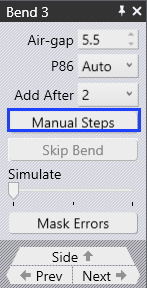
Manual Steps panel
Manual steps can be managed in the manual steps panel.
-
Use Add to insert a new manual step.
-
Use Remove- to delete an existing step.
-
The Steps list shows all the manual steps of the selected post-bend, where each step represents the relative movement of a particular axis during this step.
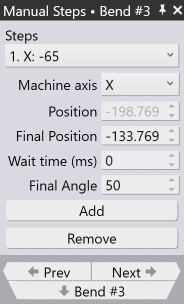
In each manual step, the following parameters can be configured:
-
Machine Axis: Selects the axis to be moved.
-
Position: The initial position of this axis at the start of this step.
-
Final Position: Specifies the final position of the selected axis at the end of this step.
-
Wait Time: Sets a pause duration (in milliseconds) before the next step is executed.
-
Final Angle: Shows the bend angle at the the end of the current step.