
Deposit panel
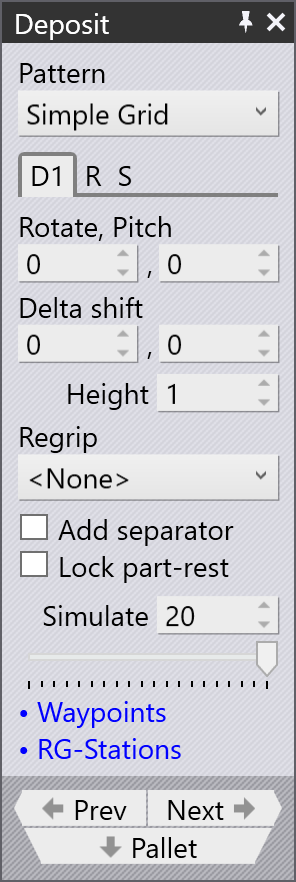
The Deposit panel manages the primary settings for placing a part onto a pallet, basket, or conveyor. Choose the most suitable pattern type for a given part. For example, the Drop to Basket pattern is usable only if you are using the mechanical gripper with a small part.
The Deposit panel has the following tabs and other options:
-
Deposit position (D1, D2,….,Dn)
-
Repeat grid (R)
-
Deposit sequence (S)
The image below shows how the deposit tabs in the bend navigator appear:

Deposit tabs D1 & D2
There are several deposit patterns available (Simple, Alternating, Weave, Basket etc). Some of these patterns (Alternating, Weave) use parts deposited in two different orientations. The orientation and other settings for these parts are edited in the D1 and optionally the D2 tabs.
Use D1 and D2 to handle the part deposit settings to drop parts over the deposit pallet.
Rotate and Pitch
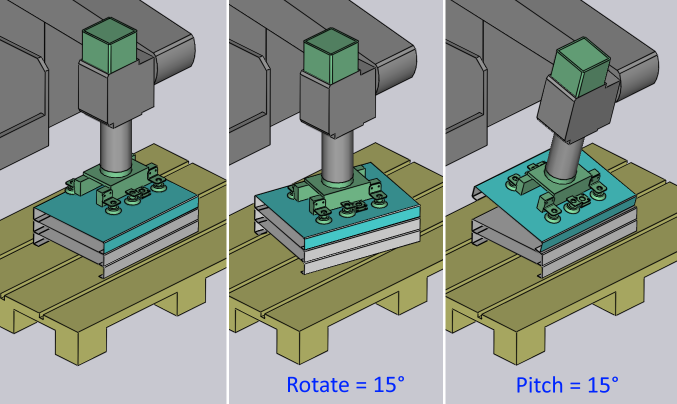
The Rotate and Pitch options control the orientation of the part at the point of drop. The Rotate setting (also known as yaw) turns the part around the wrist local vector, while the Pitch axis rotates the part about the machine Z axis.
Delta Shift
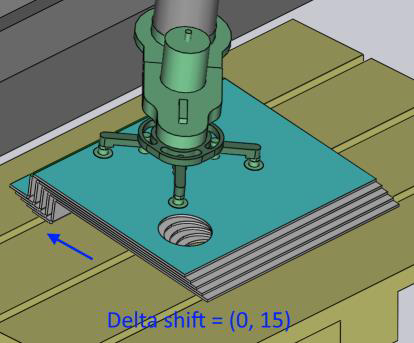
The Delta Shift option is used to shift each successive part in the deposit relative to the part underneath. You can see a shift of +15 mm in the X direction below, used to stack the parts tightly against each other in a stable manner.
Height
The Height parameter controls the height above the stack from which the part is released (the part falls by this distance when coming to rest on the stack).
We will further discuss the Deposit panel from the below topics:
Simulate
The sequence or order in which each part is placed onto the pallet can be seen by using the Simulate option. The number of layers and grid utilized for the deposit determines what quantity is simulated. The part deposit simulation can be viewed by moving the simulate slider back and forth.